✨ Custom Containers
📝 1. Create a Dockerfile
A Dockerfile defines the instructions for building your Docker image. For this example, we'll be creating a workspace with Nicotine+, a soulseek client. Here's where you'll define the base image, any dependencies, and installation steps.
- Create a docker file (This will be a Kasm Workspace with Nicotine+ installed)
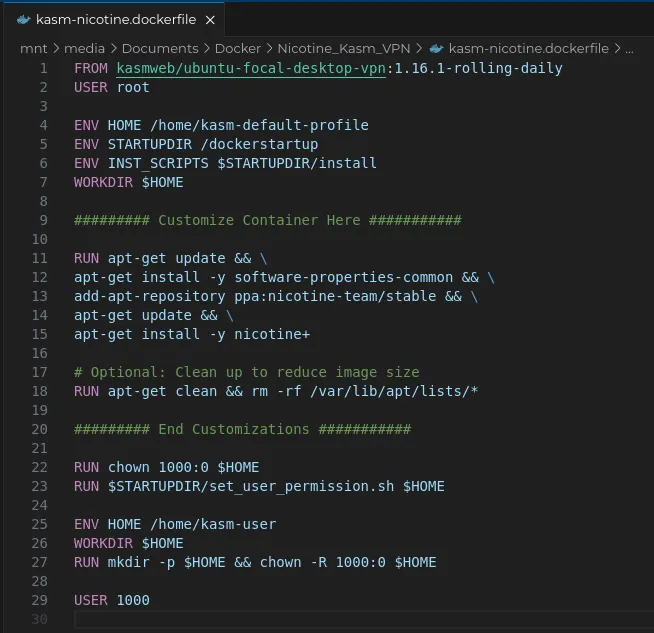
Notice we are adding the commands necessary to install and configure Nicotine+ under the Customize Container Here section.
RUN apt-get update && \
apt-get install -y software-properties-common && \
add-apt-repository ppa:nicotine-team/stable && \
apt-get update && \
apt-get install -y nicotine+
🔨 2. Build The Docker Image
Navigate to the directory where your Dockerfile is located and run the docker build command to create the image:
cd /your_project_directory/Nicotine_Kasm_VPN
docker build . --file kasm-nicotine.dockerfile --tag nicotine-kasm:latest
--file flag specifies the Dockerfile to use.
- The --tag option tags the image as nicotine-kasm:latest
This command will pull the base image, install Nicotine+, and any other dependencies defined in the Dockerfile.
🚀 3. Start a Container from Your Image
docker run -d <image_id>
-d runs the container in the background.
💾 4. Commit Your Container to a New Image
Once you’ve made any changes or configurations within the container, you’ll need to commit these changes into a new image. This step effectively "freezes" the current state of your container.
docker container commit <container_id> nicotine-kasm:latest
nicotine-kasm:latest is the new image name and tag. You can change the name to reflect your project or version.
Tip: Use docker container ps -a to view all containers, running and stopped, to find your container ID.
🏷️ 5. Tag Your Image for Docker Hub
docker tag nicotine-kasm:latest <your_dockerhub_username>/nicotine-kasm:latest
<your_dockerhub_username> with your Docker Hub username and nicotine-kasm with your chosen image name.
⬆️ 6. Push the Image to Docker Hub
docker push <your_dockerhub_username>/nicotine-kasm:latest
This command uploads your local image to the Docker Hub repository specified by your tag.
Attention
Kasm pulls images and reflects changes every hour. This means if you update your image or push a new one, it might take up to an hour for Kasm to fetch the latest version. If you want to force Kasm to pull the image immediately, you can manually refresh or restart your workspace from the Kasm UI.